
SELinux can be such a nuisance. In particular, if you have a newly created file system, you will need to add labels to it, also known as SELinux security contexts.
Inappropriate SELinux security labels can result in errors such as NGINX 403 Forbidden. The fact that SELinux could be the culprit of a 403 error is usually less than obvious.
Diagnose the problem
SELinux logs denials to:
/var/log/audit/audit.log
One of the simplest ways to poke around SELinux involves using the grep utility with audit2why, for example like this:
grep 1657864453.071:1986 /var/log/audit/audit.log | audit2why
But for more comprehensive diagnostics, sealert from setroubleshoot comes in handy:
sealert -a /var/log/audit/audit.log
Relabel your file system
In its default configuration, SELinux already has a firm idea on what security contexts to apply when restoring security labels on your system. Restoring those default labels is also pretty much straightforward:
/sbin/restorecon -R -v /var/www/html/index.html
If you think you have a badly mislabeled machine, you can fully relabel it using:
touch /.autorelabel; reboot
If no label changes or Booleans allow access (getsebool -a), you can use audit2allow to create a local policy module. Use this ability as a measure of last resort, though.
WARNING: Modules created with audit2allow may grant SELinux more leeway than may be healthy for your system. For this reason, Red Hat recommends that any policy created with audit2allow be posted to an SELinux list (such as fedora-selinux-list) for review.
If you still need help, keep reading.
Restore the default SELinux labels
The command restorecon restores the security context to the system’s default based on the default SELinux labels for each location.
Find out the default SELinux labels for NGINX
To find out the default SELinux labels for various elements of an NGINX installation, use this command:
[root@host]$ grep nginx /etc/selinux/targeted/contexts/files/file_contexts
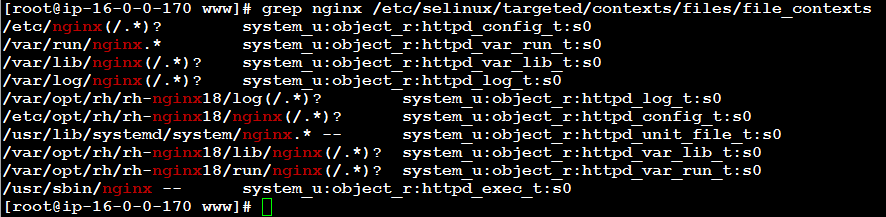
The output of this command shows default SELinux labels for NGINX installation directories:
/etc/nginx(/.*)? system_u:object_r:httpd_config_t:s0
/var/run/nginx.* system_u:object_r:httpd_var_run_t:s0
/var/lib/nginx(/.*)? system_u:object_r:httpd_var_lib_t:s0
/var/log/nginx(/.*)? system_u:object_r:httpd_log_t:s0
/var/opt/rh/rh-nginx18/log(/.*)? system_u:object_r:httpd_log_t:s0
/etc/opt/rh/rh-nginx18/nginx(/.*)? system_u:object_r:httpd_config_t:s0
/usr/lib/systemd/system/nginx.* -- system_u:object_r:httpd_unit_file_t:s0
/var/opt/rh/rh-nginx18/lib/nginx(/.*)? system_u:object_r:httpd_var_lib_t:s0
/var/opt/rh/rh-nginx18/run/nginx(/.*)? system_u:object_r:httpd_var_run_t:s0
/usr/sbin/nginx -- system_u:object_r:httpd_exec_t:s0
The default web directory (/etc/nginx/html), by default, is unconfined:
[root@ip-10-0-0-63 fedora]# ls -laZ /etc/nginx/html/
total 16
drwxr-xr-x. 2 root root unconfined_u:object_r:etc_t:s0 4096 Jun 13 00:48 .
drwxr-xr-x. 7 root root unconfined_u:object_r:etc_t:s0 4096 Jun 18 12:28 ..
-rw-r--r--. 1 root root unconfined_u:object_r:etc_t:s0 537 Jun 13 00:48 50x.html
-rw-r--r--. 1 root root unconfined_u:object_r:etc_t:s0 612 Jun 13 00:48 index.html
Find out the default SELinux labels for a CMS such as WordPress
You can easily find out the default SELinux security contexts for WordPress on your system using the command:
[root@host]$ grep wordpress /etc/selinux/targeted/contexts/files/file_contexts

/usr/share/wordpress/.*\.php -- system_u:object_r:httpd_sys_script_exec_t:s0
/usr/share/wordpress/wp-includes/.*\.php -- system_u:object_r:httpd_sys_script_exec_t:s0
/usr/share/wordpress-mu/wp-content(/.*)? system_u:object_r:httpd_sys_rw_content_t:s0
/usr/share/wordpress/wp-content/uploads(/.*)? system_u:object_r:httpd_sys_rw_content_t:s0
/usr/share/wordpress/wp-content/upgrade(/.*)? system_u:object_r:httpd_sys_rw_content_t:s0
/usr/share/wordpress-mu/wp-config\.php -- system_u:object_r:httpd_sys_script_exec_t:s0

The output may reveal some very useful information, for example:
/usr/share/wordpress-mu/wp-config\.php -- system_u:object_r:httpd_sys_script_exec_t:s0
The above line indicates that the main configuration file of WordPress named wp-config.php should receive the following SELinux security context label:
system_u:object_r:httpd_sys_script_exec_t:s0
This SELinux label will only be applied, however, if the file is located in /usr/share/wordpress-mu/, which is almost certainly not the case on your system.
Adjust SELinux security contexts
Before implementing permanent changes, it is advisable to try adjusting SELinux security labels on the affected directory tree and its contents temporarily. By doing so you can verify that your assumptions work and if not, restore the defaults (with restorecon) easily.
List current SELinux security contexts on files and directories
Listing current SELinux security contexts involves the command:
ls -laZ
The resulting output for an installation of WordPress in the web server document directory www.website1.tld may look something like this:
drwxr-x---. owner1 nginx unconfined_u:object_r:httpd_sys_content_t:s0 www.website1.tld
Adjust the SELinux security contexts without changing defaults
To (temporarily) adjust the SELinux security contexts for WordPress so that it can run:
chcon -vR system_u:object_r:httpd_sys_content_t:s0 www.website1.tld
For all .php scripts inside the WordPress installation directory and its subdirectories:
chcon -R -v system_u:object_r:httpd_sys_script_exec_t:s0 */*/*/*.php
WordPress will run with these settings, but it will fail to write updates, install themes, and plugins. (It almost makes you wonder why these settings are the defaults.)
In order to allow NGINX to write to the WordPress installation, adjust the security context on the entire WordPress installation and its subdirectories using this command:
chcon -R -v system_u:object_r:httpd_sys_rw_content_t:s0 www.website1.tld/
Save new default SELinux contexts
Make the desired changes permanent:
semanage fcontext -a -t httpd_sys_rw_content_t -s system_u "/var/www/www.website1.tld(/.*)?"
Verify that your local contexts are correct:
cat /etc/selinux/targeted/contexts/files/file_contexts.local
You can add or remove default SELinux contexts as you see fit. To remove a context that is faulty or no longer needed:
semanage fcontext -d "/var/www/www.domainname.tld(/.*)?"
Restore SELinux default labels
Finally, to restore SELinux labels from the defaults, run:
restorecon -RFv /var/www/
on the webserver document directory (adjust the path as needed).
—
Here is a primer on how to set up NGINX on EC2 from scratch.
Leave a Reply