
CloudInsidr

Cyber security, infotech

  • Subscribe!
  • Privacy Policy
  • Legal
  • Contact Us

Join us on Twitter: @CloudInsidr

Follow us on Twitter: @cloudinsidr
  • news & alerts
    • events
    • industry analysis
    • industry gossip
    • people
  • cloud, edge & co.
    • AWS
    • administration & orchestration
      • web servers in the cloud
      • mail servers
      • databases
  • cybersec & warfare
    • encryption
  • blockchain
Home cloud, edge and everything in between administration and orchestration Tip of the Day: How to Extract Domain Names from Email Addresses using Regular Expressions (RegEX)
Tip of the Day: How to Extract Domain Names from Email Addresses using Regular Expressions (RegEX)

Cloud Insidr 2015-11-26 Leave a Comment

Tip of the Day: How to Extract Domain Names from Email Addresses using Regular Expressions (RegEX)

Extracting domain names from email addresses with the help of regular expressions takes just a nanosecond once you have the formula. The formula is the key.

This is how you let your text editor find (and “understand”) each email address as two groups of characters separated by the @ symbol:

^(\S+)@(\S+)

This is how you perform the replacement, removing everything except for the domain name (as defined by the second group of characters in the regex above):

($2)

It’s that easy.
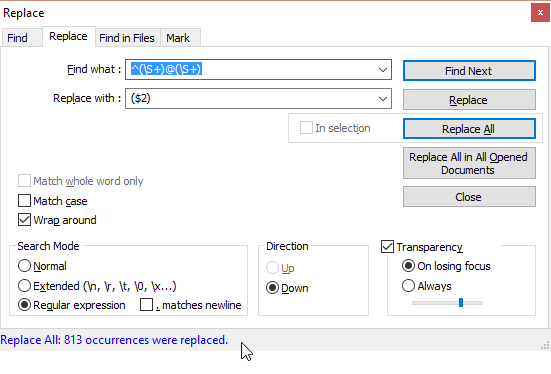
RegEx: a regular expression to extract domain or host names from email addresses
A regular expression to extract domain or host names from email addresses (here in Notepad++)

Practical Use Cases

One notable use case: Your email client may have collected untold amounts of email addresses from spammers. Now instead of blocking them on the client level (after delivery to your sorry inbox), you may want to block them at the mail server level. That’s easy enough (for example, you could be using smtpd sender restrictions in Postfix), but what if you wanted to block all senders from the offending domains? Exactly. You need to remove the user names in front of the @ sign, leaving only the domain names in the file. That’s where a regular expression can come in handy.

One more thing: how do you come up with a regular expression of your own? By using a really good RegEx editor like regex101.com and testing your regular expression on a sample of data.

Assuming that you want to match any host name on each of the domains in your Postfix configuration and reject each message that matches the sender’s address, you need to prefix each of the domain names in your list with a dot, append a space and the REJECT directive.
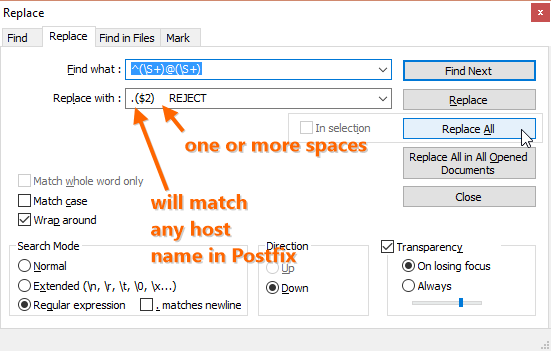
RegEx for Postfix antispam restrictions
A regular expression to extract domain or host names from email addresses for smtpd client restrictions in Postfix: spam originating from those domains will be rejected

Once this is done, you may end up with a list full of duplicates. You can sort it and remove the duplicates in Notepad++ using the module TextFX and the following commands:

  • “TextFX > TextFX Tools > + Sort outputs only UNIQUE (at column) lines” activates the first option;
  • “TextFX > TextFX Tools > + Sort ascending” activates the second option;
  • “TextFX > TextFX Tools > + Sort lines case insensitive at column” performs the magic by sorting all lines and removing duplicates.

If you need to perform some other action, you can help yourself to another regular expression (just remember to pay attention to the character encoding in your file; different systems encode line breaks differently: LF on Linux/Unix, CR/LF on Windows and CR on OS X).

Now you can use the resulting list of spamming domains to feed Postfix smtpd client restrictions through this parameter:

smtpd_client_restrictions =

as described in this post.

A word of caution, though, is in order: your email-address-list-turned-domain-list may include domain names of legitimate email service providers such as gmail.com or yahoo.com. As a result of this configuration, you would block all their users from communicating with your Postfix. This is bad for business. You may want to apply this technique only to slam-dunk cases of spamming domains, otherwise put smtpd sender restrictions in place.
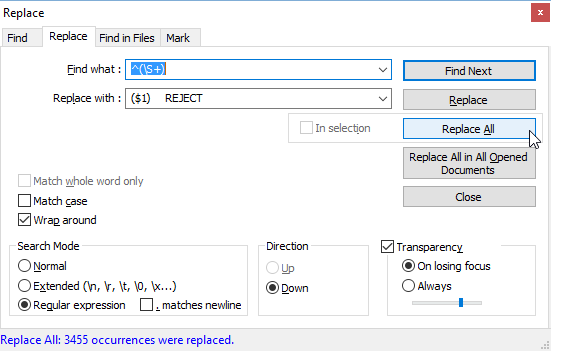
RegEx for Postfix antispam restrictions
This RegEx appends the Postfix directive REJECT to full email addresses of spammers creating a config file for smtpd sender restrictions

Either method will take a huge workload off of your MX server.

Filed Under: administration and orchestration, mail servers Tagged With: anti-spam defense, Notepad++, RegEx, regular expression

Leave a Reply Cancel reply

Your email address will not be published. Required fields are marked *

Subscribe

SSL/TLS Certificate Square (250 x 250)

Pearson Education (InformIT)

SSL/TLS Certificate Medium Rectangle (300 x 250)

Recent Posts

  • Upgrading from CentOS 6 to CentOS 7 and Beyond?
  • How To Figure Out Who is Signing In To Dovecot to Send or Retrieve Email
  • OpenSSH 9.9 Introduces Enhanced Quantum-Resistant Algorithms
  • OpenSSL 3.3 Final Release is now live!
  • How to Activate HTTP/2 with TLS 1.3 Encryption in NGINX for Secure Connections without a Performance Penalty
  • Is AWS sucking your budget dry? Strip it down to the nitty-gritty (without breaking stuff)
  • How to attach and mount an NVMe EBS volume on EC2
  • SELinux security contexts: correcting SELinux labels on a file system
  • Intel gobbling up Israeli Tower Semiconductor, Stock Goes Through The Roof
  • NGINX on AWS EC2: setting up a web server from scratch on a domain of your choice
  • Log4j RCE and mitigation techniques
  • Set up logrotate for Postfix

Symantec

Categories

  • administration and orchestration
  • alerts
  • AWS
  • Bitcoin
  • cloud, edge and everything in between
  • cryptocurrencies
  • cybersecurity and cyber warfare
  • databases
  • DNS
  • encryption
  • events
  • FinTech and InsurTech
  • homeland security
  • HTTP Security Headers
  • industries
  • industry analysis
  • industry gossip
  • Java
  • Linux
  • mail servers
  • networking
  • news
  • NGINX
  • people
  • php-fpm
  • reviews
  • SELinux
  • tips and tricks
  • Uncategorized
  • web servers in the cloud

Tags

AMI AWS AWS EBS Azure certificate cipher suites cryptography cyber defense cybersecurity cyber security Diffie-Hellman DNS DNS over HTTPS Dovecot EBS EC2 email encryption Fedora HTTP/2 HTTPS IBM letsencrypt Linux logs MariaDB MFA MySQL NGINX OpenSSL permissions php-fpm PHP 7 postfix RegEx Route 53 RSA SELinux SQL SSH SSL TLS TLS 1.3 TLS vulnerabilities WordPress

Archives

  • January 2025
  • November 2024
  • October 2024
  • May 2024
  • January 2023
  • March 2022
  • February 2022
  • December 2021
  • December 2020
  • November 2020
  • September 2020
  • January 2020
  • November 2019
  • August 2019
  • July 2019
  • April 2019
  • December 2018
  • October 2018
  • September 2018
  • August 2018
  • June 2018
  • May 2018
  • April 2018
  • February 2018
  • December 2017
  • November 2017
  • October 2017
  • August 2017
  • April 2017
  • February 2017
  • January 2017
  • November 2016
  • September 2016
  • August 2016
  • July 2016
  • March 2016
  • February 2016
  • January 2016
  • December 2015
  • November 2015
  • October 2015
  • September 2015
  • July 2015
  • February 2015

Recent Comments

    Wicked fast Networking (With a Government Clearance to Boot)

    ©2022 CybrAnalytiqa OÜ

    • Content purchasing and syndication