
CloudInsidr

Cyber security, infotech

  • Subscribe!
  • Privacy Policy
  • Legal
  • Contact Us

Join us on Twitter: @CloudInsidr

Follow us on Twitter: @cloudinsidr
  • news & alerts
    • events
    • industry analysis
    • industry gossip
    • people
  • cloud, edge & co.
    • AWS
    • administration & orchestration
      • web servers in the cloud
      • mail servers
      • databases
  • cybersec & warfare
    • encryption
  • blockchain
Home cloud, edge and everything in between administration and orchestration How to Restore Your Instance Data from a Backup using Snapshots on AWS EC2/EBS
How to Restore Your Instance Data from a Backup using Snapshots on AWS EC2/EBS

Filipe Martins 2016-02-16 Leave a Comment

How to Restore Your Instance Data from a Backup using Snapshots on AWS EC2/EBS

You are writing all these backups as individual EC2 snapshots and/or full AMIs on AWS EC2 but how can you actually use them, should disaster befall your data?

Here is how to do that on Linux.

Step 1. Create a volume from a snapshot

In the AWS Management Console, find the snapshot that holds you backup.
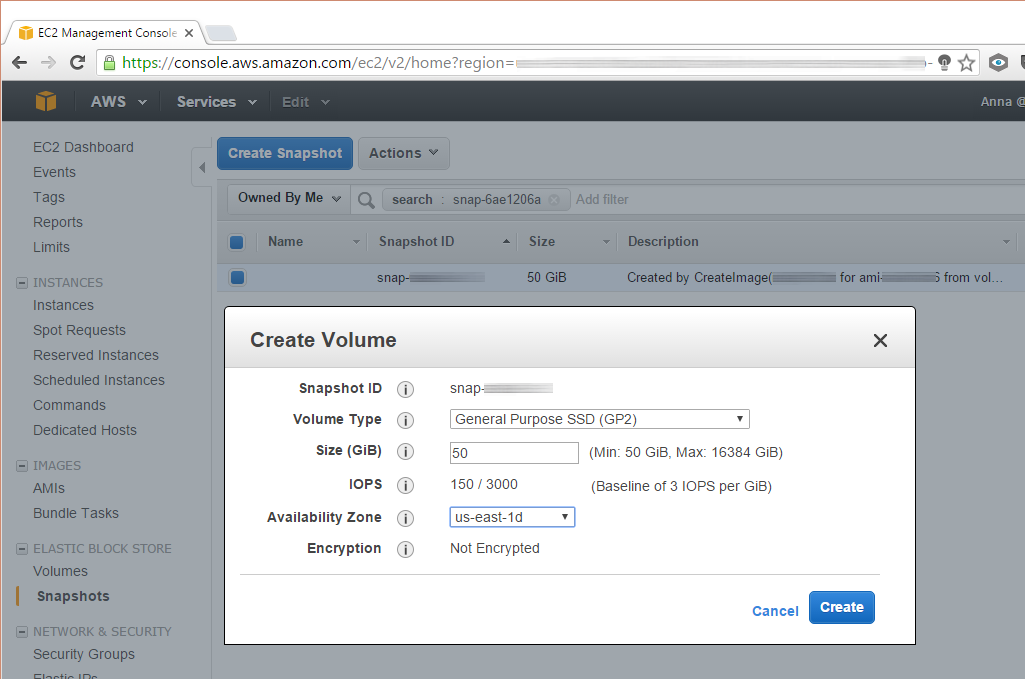
AWS EC2: create an EBS volume from a snapshot

Next, create a volume from it and attach the volume to your running instance.
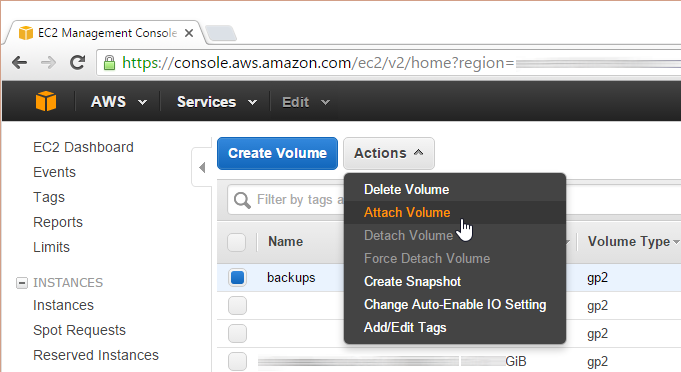
AWS EC2: attaching an EBS volume to an instance

Add a name label to your volume to help avoid a mishap.
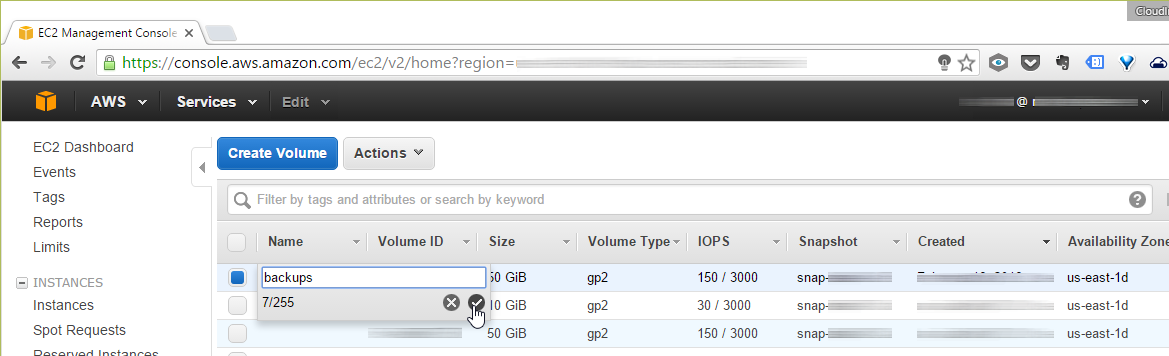
AWS EC2: Label your EBS volume
Step 2. Identify your backup volume in Linux

Now is the time to have a look at the currently attached file systems:

fdisk -l

Compare this with the contents of fstab:

cat /etc/fstab

Make a note of the address of the volume.

Step 3. Replace the UUID and adjust the label

Read out the UUID of the supplemental drive:

xfs_admin -u /dev/xvdg1

Replace the UUID with a newly generated one:

xfs_admin -U generate /dev/xvdg1

Change the label:

xfs_admin -L "Backup" /dev/xvdg1

You should see output resembling this one:

writing all SBs

new label = "Backup"
Step 4. Mount the file system

Before you can access the volume, you need to mount the file system:

mount /dev/xvdg1 /var/www/backup

Should you encounter problems, see:

dmesg | tail

for leads on trooubleshooting.

Step 5. Do your thing with the backup

Next, switch to the source directory containing your backup files:

cd /path/to/your/backup

Then copy or move the files.

Step 6. Always clean up after yourself

Exit the directory and unmount the volume:

cd /
umount /dev/xvdg1

Now feel free to detach the volume and destroy it (you still get to keep the original snapshot!).

Related: How to ramp up your defenses: a cyber security showdown of AWS versus Microsoft Azure.

Filed Under: administration and orchestration Tagged With: AWS, EBS, EC2

Leave a Reply Cancel reply

Your email address will not be published. Required fields are marked *

Subscribe

SSL/TLS Certificate Square (250 x 250)

Pearson Education (InformIT)

SSL/TLS Certificate Medium Rectangle (300 x 250)

Recent Posts

  • Upgrading from CentOS 6 to CentOS 7 and Beyond?
  • How To Figure Out Who is Signing In To Dovecot to Send or Retrieve Email
  • OpenSSH 9.9 Introduces Enhanced Quantum-Resistant Algorithms
  • OpenSSL 3.3 Final Release is now live!
  • How to Activate HTTP/2 with TLS 1.3 Encryption in NGINX for Secure Connections without a Performance Penalty
  • Is AWS sucking your budget dry? Strip it down to the nitty-gritty (without breaking stuff)
  • How to attach and mount an NVMe EBS volume on EC2
  • SELinux security contexts: correcting SELinux labels on a file system
  • Intel gobbling up Israeli Tower Semiconductor, Stock Goes Through The Roof
  • NGINX on AWS EC2: setting up a web server from scratch on a domain of your choice
  • Log4j RCE and mitigation techniques
  • Set up logrotate for Postfix

Symantec

Categories

  • administration and orchestration
  • alerts
  • AWS
  • Bitcoin
  • cloud, edge and everything in between
  • cryptocurrencies
  • cybersecurity and cyber warfare
  • databases
  • DNS
  • encryption
  • events
  • FinTech and InsurTech
  • homeland security
  • HTTP Security Headers
  • industries
  • industry analysis
  • industry gossip
  • Java
  • Linux
  • mail servers
  • networking
  • news
  • NGINX
  • people
  • php-fpm
  • reviews
  • SELinux
  • tips and tricks
  • Uncategorized
  • web servers in the cloud

Tags

AMI AWS AWS EBS Azure certificate cipher suites cryptography cyber defense cybersecurity cyber security Diffie-Hellman DNS DNS over HTTPS Dovecot EBS EC2 email encryption Fedora HTTP/2 HTTPS IBM letsencrypt Linux logs MariaDB MFA MySQL NGINX OpenSSL permissions php-fpm PHP 7 postfix RegEx Route 53 RSA SELinux SQL SSH SSL TLS TLS 1.3 TLS vulnerabilities WordPress

Archives

  • January 2025
  • November 2024
  • October 2024
  • May 2024
  • January 2023
  • March 2022
  • February 2022
  • December 2021
  • December 2020
  • November 2020
  • September 2020
  • January 2020
  • November 2019
  • August 2019
  • July 2019
  • April 2019
  • December 2018
  • October 2018
  • September 2018
  • August 2018
  • June 2018
  • May 2018
  • April 2018
  • February 2018
  • December 2017
  • November 2017
  • October 2017
  • August 2017
  • April 2017
  • February 2017
  • January 2017
  • November 2016
  • September 2016
  • August 2016
  • July 2016
  • March 2016
  • February 2016
  • January 2016
  • December 2015
  • November 2015
  • October 2015
  • September 2015
  • July 2015
  • February 2015

Recent Comments

    Wicked fast Networking (With a Government Clearance to Boot)

    ©2022 CybrAnalytiqa OÜ

    • Content purchasing and syndication