
CloudInsidr

Cyber security, infotech

  • Subscribe!
  • Privacy Policy
  • Legal
  • Contact Us

Join us on Twitter: @CloudInsidr

Follow us on Twitter: @cloudinsidr
  • news & alerts
    • events
    • industry analysis
    • industry gossip
    • people
  • cloud, edge & co.
    • AWS
    • administration & orchestration
      • web servers in the cloud
      • mail servers
      • databases
  • cybersec & warfare
    • encryption
  • blockchain
Home Archives for 2015

Archives for 2015

Understanding and Setting/Changing Access Privileges on Unix/Linux Files and Directories: Mode Bits/Permissions and Alternative Access Methods Explained

Cloud Insidr 2015-10-21 Leave a Comment

Understanding and Setting/Changing Access Privileges on Unix/Linux Files and Directories: Mode Bits/Permissions and Alternative Access Methods Explained

Mode bits in Linux/Unix have been puzzling newbies to no end:

-rwxrwxrwx. 1 owner group 420 Dec 21 12:46 .bash_history

The first mode bit designates the type of the item; the following nine mode bits indicate access permissions on the item with respect to the owner, the group and all other users.

Special file designator

The first character field is a special file designator. It can indicate that an item is:

  • a directory (d);
  • a symlink or symbolic link (l);
  • a Unix socket (s);
  • a block device (b);
  • a named pipe (p) such as initctl;
  • a character device (c);
  • a “door” (D); rarely used, but nonetheless supported.

For lack of a letter, a leading ‘–‘ in place of a special file designator indicates that the item in question is a regular file.

Permissions (file mode) bits

Each consecutive three characters within the nine permissions bits represent privileges that may be assigned to the owner of an item (the first three characters after the special file designator), the group (the next three characters), and/or everyone else (the next three characters). Unix/Linux supports the following permissions:

  • read (r);
  • write (w);
  • execute a file or list a directory or perform a search within a directory (x);
  • in the owner’s or group’s permissions: set-user-ID mode on a file that is not executable (S);
  • in the owner’s or group’s permissions: set-user-ID mode on an executable file (s).

For example the following notation:

-rw-r----- someuser somegroup filename

translates as follows:

  • the item is a file (-),
  • the user ‘someuser’ has read and write permissions (rw-) on it,
  • the group somegroup has only read permissions (r–) on it, and
  • everyone else can neither read nor write nor execute the file (—).

Setting read, write, and execute permissions for the owner, group, and everyone else

Unix permissions can be expressed numerically as powers of two:

  • r equals 4 (2^2; the lack of this privilege is represented by a 0),
  • w equals 2 (2^1; the lack of this privilege is represented by a 0),
  • x equals 1 (2^0; the lack of this privilege is represented by a 0).

This designation ensures that there is no room for overlaps. Undefined permissions aren’t possible, either. It’s as clear cut as it gets.
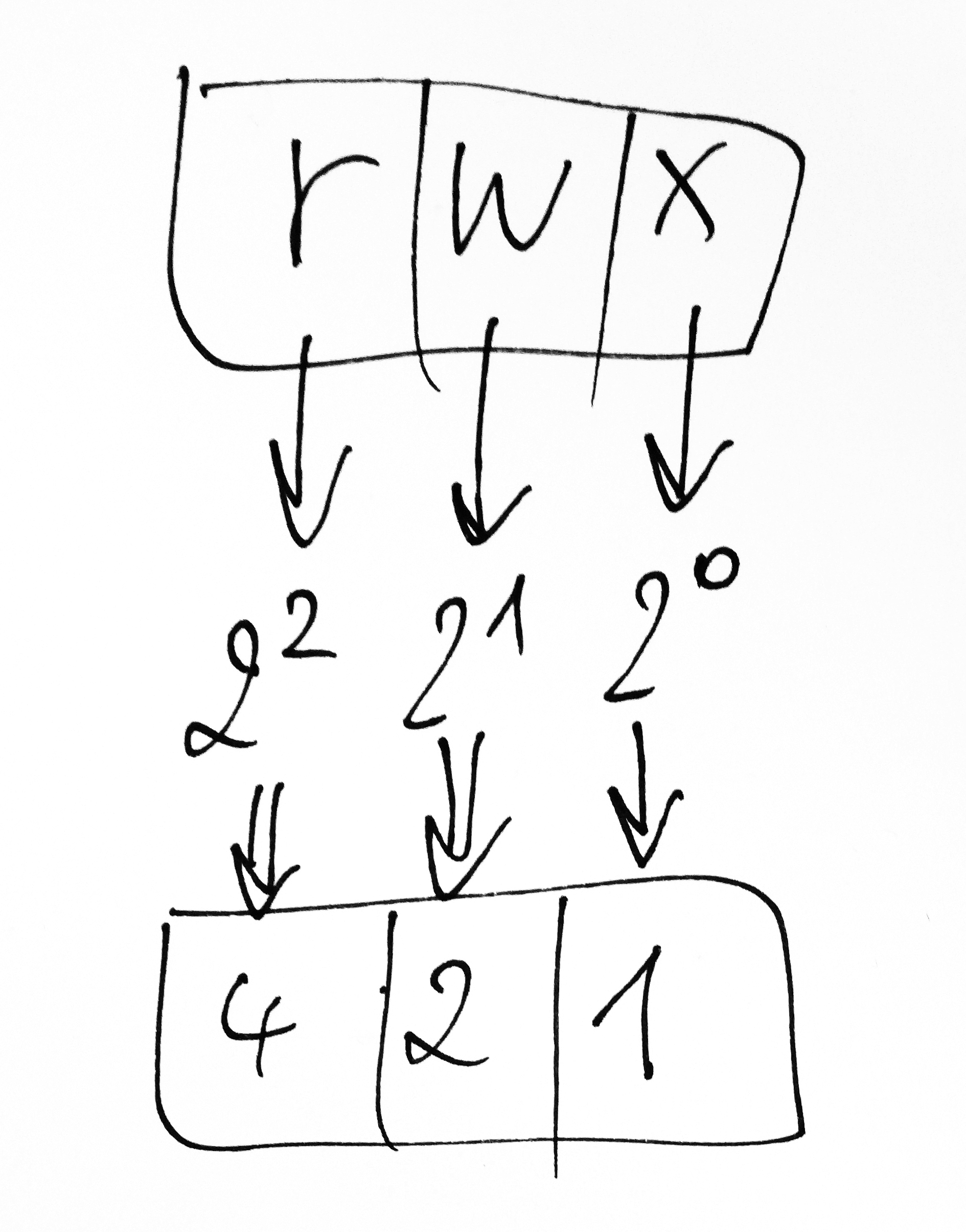
Unix/GNU Linux permissions/mode bits: read, write, execute (in grayscale)
Unix/GNU Linux permissions/mode bits: read, write, execute

To arrive at a numerical value for permissions that affect an entity class such as the owner, the group or everyone else (meaning all users that neither belong to the group nor own the object), all you have to do is sum up the permissions that represent privileges of this entity class (the owner’s, the group’s, and everyone else’s permissions, one single digit for each class).

If an entity class such as the owner, the group or ‘everyone else’ has read (4), write (2), and execute (1) permissions, these equal 7 (4+2+1=7).

Likewise, if an entity class such as the owner, the group or ‘everyone else’ can read (4) and execute (1) a file but not write (0) to it, the permissions equal 5 (4+0+1=5).

If an entity class such as the owner, the group or ‘everyone else’ has read (4) permissions only, these permissions are represented by the digit 4 (4+0+0=4).

This is how you can change privileges on a file in a way that only grants its owner read, write, and execute permissions:

chmod 700 filename 
ls -l filename
-rwx------ owner group filename

Inheritance

When a new file is created, it usually inherits the group id of its creator. However, there are exceptions from the rule.

SGID

If you want new files to inherit the group id of their parent folder, enable the SGID (Set Group ID on execution) bit on that folder.

Sticky bit

In addition to the above, the permissions to delete or rename a file or directory can be limited to its owner and the root user by means of setting a sticky bit (mode 1000) in one of two scenarios:

  • sticky bit on an object without execute or search permissions (T);
  • sticky bit on an object that is either an executable file or a searchable directory (t).

In each case, the sticky bit appears in place of the last one of the three mode bits that denote permissions for “everyone else”.

Alternate access method designator

Following the file mode bits is a single character that specifies an alternate access method such as an access control list. When the character following the file mode bits is a space, there is no alternate access method. When it is a printing character, then there is such a method.

GNU ‘ls’ command uses a dot (‘.‘) to indicate a file with an SELinux security context and no other alternate access method. A file with any other combination of alternate access methods is marked with a ‘+‘ character.

In order to read out the alternate access methods, you can use the command:

getfacl

for example like this:

-rw-------. 1 centos centos 586 Oct 21 15:03 authorized_keys getfacl . # file: . # owner: centos # group: centos user::rwx group::--- other::---


Tip: use this SELinux label for a temp directory

chcon -t tmp_t temp

Filed Under: administration and orchestration, cloud, edge and everything in between, cybersecurity and cyber warfare Tagged With: ACL, permissions, SELinux, special file designator, symlink

Cloud Insidr 2015-09-09 Leave a Comment

How to Figure out Your PHP Configuration Parameters without info.php

One way to find out the details of your PHP configuration is by saving

<?php phpinfo(); ?>

in a text file with the extension .php in a web server directory. You can name this file whatever you want; its customary name is info.php. When you visit the corresponding URI in your web browser, it will show you all the relevant details of your configuration. This method, however, leaves you vulnerable: it discloses details to the public that should be nobody’s business but the administrator’s. It is certainly not a good policy to leave the file on the server and too much hassle to create it every time it’s needed. Luckily, there is a better way.

[Read more…]

Filed Under: cybersecurity and cyber warfare, web servers in the cloud

Cloud Insidr 2015-07-02 Leave a Comment

MariaDB Running Out of Memory? Here Is What You Can Do About It

On small virtual servers with insufficient memory, MariaDB can give you a lot of trouble. It will crash, refuse to restart, and populate logs with errors. If trading your virtual server for another host is temporarily not an option, you can implement a quick fix.

[Read more…]

Filed Under: Uncategorized

How to migrate your web services from any hosting provider to AWS

Cloud Insidr 2015-02-25 Leave a Comment

How to migrate your web services from any hosting provider to AWS

Leaving your current web hosting provider for the cloud experience may feel rather scary, but in reality, it is a liberating experience.

Just think of all the freedom you gain to run your web services your way: the ability to use any DNS provider of your choice, any certificate authority (such as, most notably, the disruptive force of Letsencrypt), install software to your heart’s content, scale up and out on demand, in other words, be in charge of your own services and infrastructure. Here is a quick tutorial on how to make the leap.

[Read more…]

Filed Under: cloud, edge and everything in between, NGINX, web servers in the cloud Tagged With: AWS, EC2, Linux, NGINX, WordPress

  • « Previous Page
  • 1
  • 2
  • 3
  • 4

Subscribe

SSL/TLS Certificate Square (250 x 250)

Pearson Education (InformIT)

SSL/TLS Certificate Medium Rectangle (300 x 250)

Recent Posts

  • Upgrading from CentOS 6 to CentOS 7 and Beyond?
  • How To Figure Out Who is Signing In To Dovecot to Send or Retrieve Email
  • OpenSSH 9.9 Introduces Enhanced Quantum-Resistant Algorithms
  • OpenSSL 3.3 Final Release is now live!
  • How to Activate HTTP/2 with TLS 1.3 Encryption in NGINX for Secure Connections without a Performance Penalty
  • Is AWS sucking your budget dry? Strip it down to the nitty-gritty (without breaking stuff)
  • How to attach and mount an NVMe EBS volume on EC2
  • SELinux security contexts: correcting SELinux labels on a file system
  • Intel gobbling up Israeli Tower Semiconductor, Stock Goes Through The Roof
  • NGINX on AWS EC2: setting up a web server from scratch on a domain of your choice
  • Log4j RCE and mitigation techniques
  • Set up logrotate for Postfix

Symantec

Categories

  • administration and orchestration
  • alerts
  • AWS
  • Bitcoin
  • cloud, edge and everything in between
  • cryptocurrencies
  • cybersecurity and cyber warfare
  • databases
  • DNS
  • encryption
  • events
  • FinTech and InsurTech
  • homeland security
  • HTTP Security Headers
  • industries
  • industry analysis
  • industry gossip
  • Java
  • Linux
  • mail servers
  • networking
  • news
  • NGINX
  • people
  • php-fpm
  • reviews
  • SELinux
  • tips and tricks
  • Uncategorized
  • web servers in the cloud

Tags

AMI AWS AWS EBS Azure certificate cipher suites cryptography cyber defense cybersecurity cyber security Diffie-Hellman DNS DNS over HTTPS Dovecot EBS EC2 email encryption Fedora HTTP/2 HTTPS IBM letsencrypt Linux logs MariaDB MFA MySQL NGINX OpenSSL permissions php-fpm PHP 7 postfix RegEx Route 53 RSA SELinux SQL SSH SSL TLS TLS 1.3 TLS vulnerabilities WordPress

Archives

  • January 2025
  • November 2024
  • October 2024
  • May 2024
  • January 2023
  • March 2022
  • February 2022
  • December 2021
  • December 2020
  • November 2020
  • September 2020
  • January 2020
  • November 2019
  • August 2019
  • July 2019
  • April 2019
  • December 2018
  • October 2018
  • September 2018
  • August 2018
  • June 2018
  • May 2018
  • April 2018
  • February 2018
  • December 2017
  • November 2017
  • October 2017
  • August 2017
  • April 2017
  • February 2017
  • January 2017
  • November 2016
  • September 2016
  • August 2016
  • July 2016
  • March 2016
  • February 2016
  • January 2016
  • December 2015
  • November 2015
  • October 2015
  • September 2015
  • July 2015
  • February 2015

Recent Comments

    Wicked fast Networking (With a Government Clearance to Boot)

    ©2022 CybrAnalytiqa OÜ

    • Content purchasing and syndication