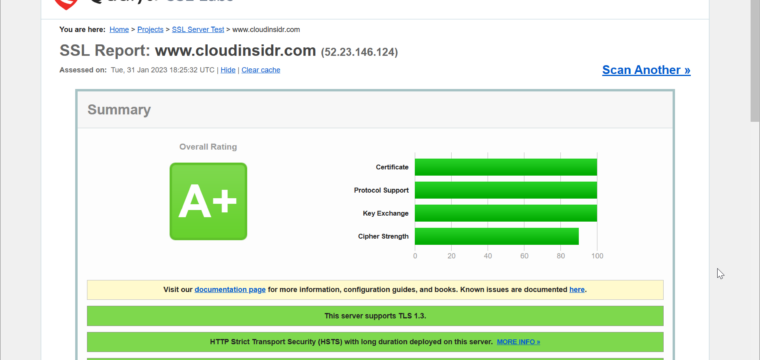
Are you ready for a better security with no performance penalty? Are you ready for a performance bump that can take you places in search engine land? In other words: now that HTTP/2 reached production-grade maturity, nothing should hold you back.
The IoT revolution will make sure that only the paranoid survive.
In order to upgrade your server to HTTP/2 and encrypted connections, you will need:
- a web server version that supports the protocol (for NGINX, version 1.9.5 or above);
- an SSL certificate and key from a respected CA (doesn’t need to be pricey but has to be SHA-2 if you are serious about it);
- a couple of minutes or hours to compute your own Diffie Hellman group
- a few battle-tested configuration options.
Now focus, please.
Step 1. Activate HTTP/2
In Nginx’s site configuration file, make sure you have this in your server block:
server {
 listen 80;
 listen 443 ssl http2;
The http2 directive will do the trick. The HTTP/2 spec does not require encryption, but browsers do.
Once this is in place, you have to configure NGINX to handle encrypted connections.
Step 2. Obtain and install an SHA-2 certificate from a respectable CA
Except for testing (in which case a self-signed certificate is fine), you will have to shell out some pocket change to obtain an SSL certificate from a respectable CA (would you like some recommendations? please comment). Whatever you decide to do, make sure the CA doesn’t issue you an SHA-1 certificate. These are worse than worthless: they have been proven to be susceptible to collision attacks (like the FLAME malware that attacked MD5).
Save the certificate and the key on your server and make sure it is owned by root and read-accessible to the group NGINX:
chown root:nginx CA-issued.*
Step 3. Point your server to your SSL certificate and key files
In the site configuration file in NGINX, point the server to your SHA-2 certificate and the key file:
ssl_certificate /etc/nginx/CA-issued/CA-issued.cert;
ssl_certificate_key /etc/nginx/CA-issued/CA-issued.key;
Step 4. Specify communications protocols for encrypted connections
If you are serious about security, you should not enable SSL (it’s been compromised) nor allow a downgrade to TLS 1.0 or TLS 1.1. The only acceptable protocols are TLS 1.3 and TLS 1.2.
Enter this into the configuration file of your site in NGINX:
ssl_protocols TLSv1.3 TLSv1.2;
Step 5. Specify cipher suites using ECDHE: (Ephemeral) Elliptic-Curve Diffie-Hellman key exchange and prohibit a compromise
This directive allows you to specify ciphers in NGINX:
ssl_ciphers ‘TLS13-CHACHA20-POLY1305-SHA256:TLS13-AES-256-GCM-SHA384:TLS13-AES-128-GCM-SHA256:EECDH+AESGCM:EDH+AESGCM:AES256+EECDH:AES256+EDH’;
Now the question is, how do you figure out which cipher suites are acceptable? Mozilla offers a helpful ssl-config-generator that will give you recommended (option ‘modern profile’) and/or supported (‘old profile’) ciphers for any given version of your web server and OpenSSL.
Make sure you deploy (Ephemeral) Elliptic-Curve Diffie-Hellman (ECDHE-) variants and NOT the original, finite field, Diffie-Hellman (DHE-). Tweak Mozilla’s ‘modern profile’ output of the NGINX ssl_ciphers parameter to that end if you want to be paranoid (why wouldn’t you want to? no valid reasons).
Tell the server to override any preferences the client may report as own by setting this parameter:
ssl_prefer_server_ciphers on;
Last but not least, specify the curve type. Chose a modern ECDH (elliptic curve DH) in OpenSSL 1.1.1:
ssl_ecdh_curve secp384r1;
Step 6. Replace your server’s Diffie-Hellman group
By default, many web servers use a weak Diffie-Hellman group that has been broken by rogue nation states and cannot be considered safe by any stretch of imagination. Do yourself a favor and replace it asap.
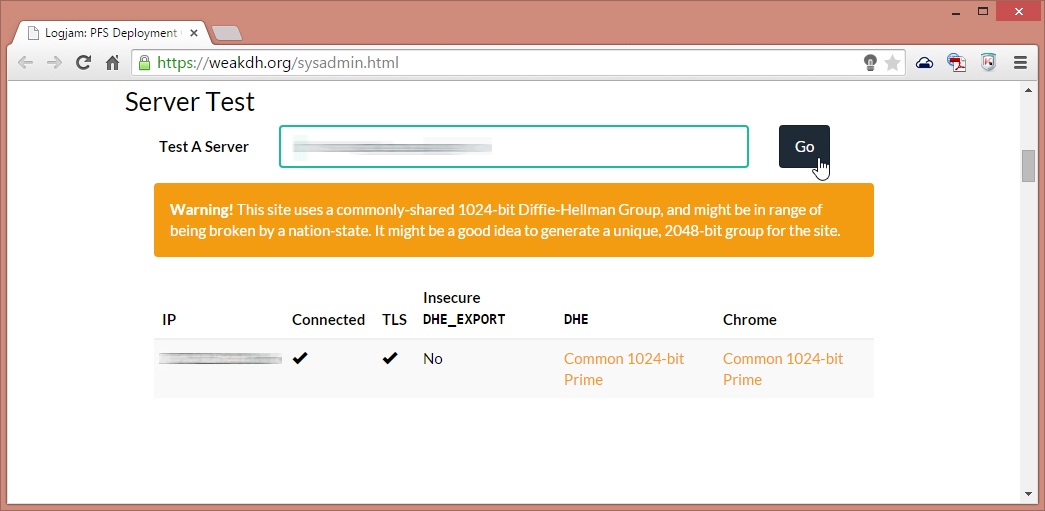
(If you need a crypto expert to scare you into revving up security, so be it: glance over “Breaking Diffie-Hellman with Massive Precomputation (Again)” by Bruce Schneier and you’ll gladly read this guide on how to protect yourself as the end user and how to protect your end users by securing your SSH, too.)
In order to generate your new group, you can use openssl directly on your server (ask for a key no shorter than 4096):
openssl dhparam -out dhparams.pem 4096 & bg
(The process should take between a few minutes and a few hours, depending on your system.) Change the permissions to the resulting key file to allow your server user’s group read access only (the owner remains root):
chown root:nginx dhparams.pem
In the site configuration file in NGINX, point the web server to your shiny new Diffie-Hellman key:
 # Diffie-Hellman parameter for DHE cipher suites
 ssl_dhparam /etc/nginx/dhparams-4096.pem;
At this point, you are done. Save the configuration file and restart your server for the changes to take effect:
service nginx restart
Step 7. Disallow unencrypted HTTP by enabling HSTS
HSTS (HTTP Strict Transport Security) is a web security policy mechanism designed to help protect HTTPS websites against downgrade attacks and cookie hijacking (RFC 6797). With HSTS, the web server sends an HTTP response header field named “Strict-Transport-Security“, which tells the client to interact using HTTPS only.
This only works with compliant user agents, however, the setting will help protect legitimate visitors but will not protect your site from malicious HTTP communications. For this reason, you may want to redirect HTTP requests using a server directive (to that end, you will have to temporarily disable HSTS in order to verify that your redirects are actually working).
In NGINX, enter this into the configuration file of each site within the server block:
# HSTS (requires ngx_http_headers_module)
# 15768000 seconds = 6 months
# in seconds, 365 days, including subdomains
# do NOT use max-age of zero; it will disable the policy!
add_header Strict-Transport-Security "max-age=31536000; includeSubDomains; always";
In order to enforce https, enter this in the location block (rewrites are not recommended):
return 301 https://www.your-domain.tld/$request_uri;
Step 8. Stay vigilant (in perpetuity!)
Now head over to the SSL scanner by Qualys SSL Labs and run a test on each one of your domains to make sure you haven’t overlooked anything.
Feeling accomplished yet? Well, the arms race never ends. Feel free to pat yourself firmly on the shoulder but please remember: ongoing vigilance is not just a virtue in cybersecurity, it is a prerequisite for survival!
Leave a Reply