CloudInsidr

Cyber security, infotech

  • Subscribe!
  • Privacy Policy
  • Legal
  • Contact Us

Join us on Twitter: @CloudInsidr

Follow us on Twitter: @cloudinsidr
  • news & alerts
    • events
    • industry analysis
    • industry gossip
    • people
  • cloud, edge & co.
    • AWS
    • administration & orchestration
      • web servers in the cloud
      • mail servers
      • databases
  • cybersec & warfare
    • encryption
  • blockchain
Home cloud, edge and everything in between How to Check CPU Credits Usage and Remaining Balance of a Burstable Performance Instance on AWS EC2
How to Check CPU Credits Usage and Remaining Balance of a Burstable Performance Instance on AWS EC2

Cloud Insidr 2016-01-11 Leave a Comment

How to Check CPU Credits Usage and Remaining Balance of a Burstable Performance Instance on AWS EC2

For workloads that don’t require a consistent CPU performance but do experience spikes in service demand, Amazon’s AWS EC2 service offers Burstable Performance Instances. Their competitive pricing can contribute to considerable savings and improve service availability, but how do you know if you are getting a good deal? You don’t, unless you are able to verify your CPU credits usage and the remaining balance. Here is how to figure out what’s really going on.

In terms of its CPU performance, each type of an AWS EC2 instance belongs to one of two different categories:

  • Fixed Performance Instances (m3, c3, etc.) and
  • Burstable Performance (such as t2).

A Fixed Performance Instance offers a consistent CPU performance throughout its lifetime, which also means that you will be paying for all idle CPU cycles even though your instance isn’t using them.

Burstable Performance Instances provide a baseline CPU performance that allows your instance to operate predictably and burst on demand.

When you create an instance of the Burstable Performance type, AWS allocates to it an initial amount of CPU credits. Hour by hour, your instance keeps accruing a certain amount of CPU credits that accumulate over the course of a month. During spikes of demand for CPU resources, an instance with a positive credit balance may temporarily increase its CPU performance and meet its operational requirements far above the baseline level, up to the total amount of available CPU credits.

A real-world example of a burstable performance instance on EC2 in action

In the image below, you can see the CloudWatch Monitoring Details graph depicting the metric CPU Credit Usage for a burstable performance instance on EC2 as a Maximum in a period of 5 minutes. The sudden spike in credit balance was a result of computing an 8192 bit Diffie-Hellman encryption job.
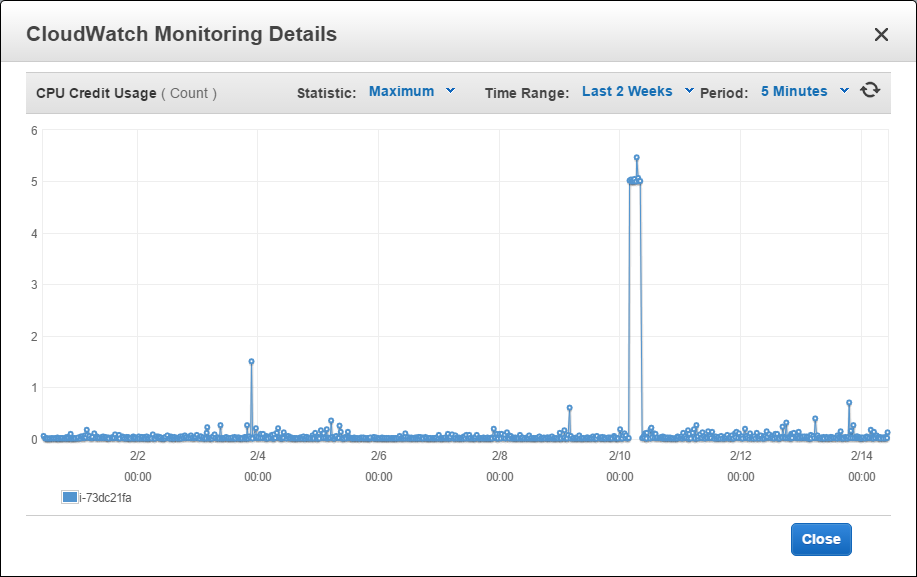
CloudWatch monitoring for a burstable perforrmance instance on EC2

The following graph shows the other side of the coin: the metric CPU Credit Balance for the same burstable performance instance on EC2: the drop in credit balance is a result of the same 8192 bit Diffie-Hellman encryption job.
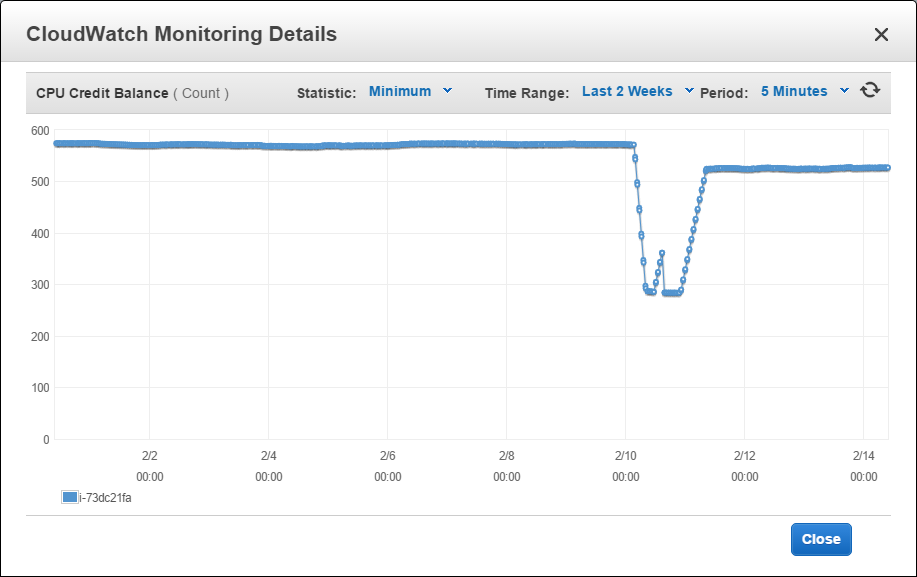
CloudFront monitoring for a burstable perforrmance instance in the AWS Management Console
CloudFront monitoring for a burstable perforrmance instance: watch your CPU credits rise and fall

The above graph shows that the remaining credits balance continues to offer a sufficient margin of safety (even though at one point the remaining balance had fallen considerably, it has never reached the bottom and it has managed to somewhat recover).

Baseline performance is guaranteed

Should your instance run out of CPU credits (your CPU Credit Balance fall to zero), your instance will continue to operate on baseline performance until it receives additional credit.

Verify your balance of CPU credits

You can verify your balance of CPU credits over time using the AWS Management Console for CloudWatch. Navigate to the section Metrics > EC2 and filter the list of available metrics using the Seatch Metrics field either by instance ID or by metric name.
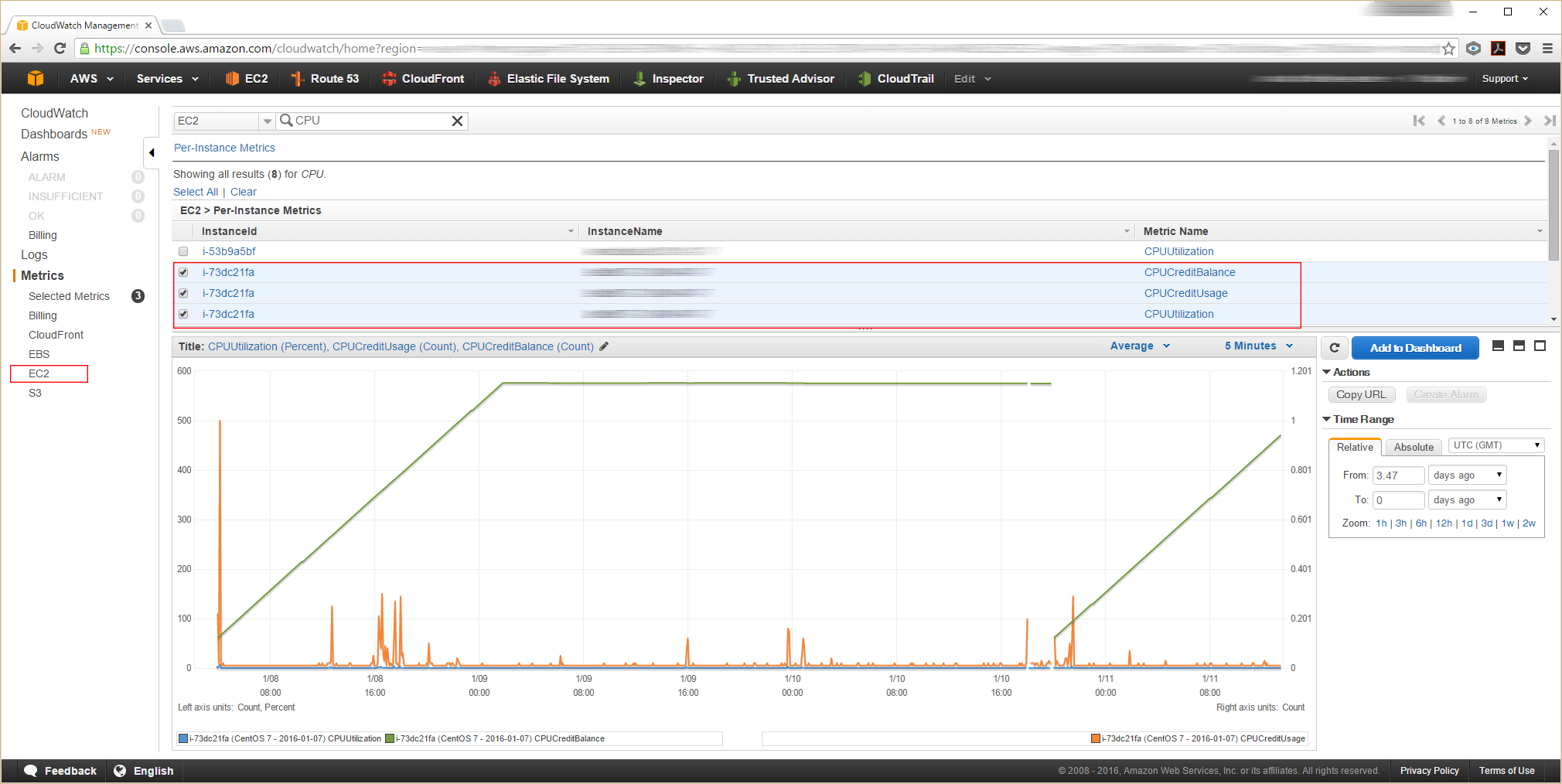
AWS Management Console: verifying CPU-related metrics

Select the instance(s) you want to investigate by activating the checkbox next to each relevant entry. The AWS Management Console displays the relevant graphs in the lower section of the document window. You can navigate along the timeline and adjust other parameters.

Look at these metrics:

  • CPUCreditBalance,
  • CPUCreditUsage, and
  • CPUUtilization.
AWS Management Console: CPU credits
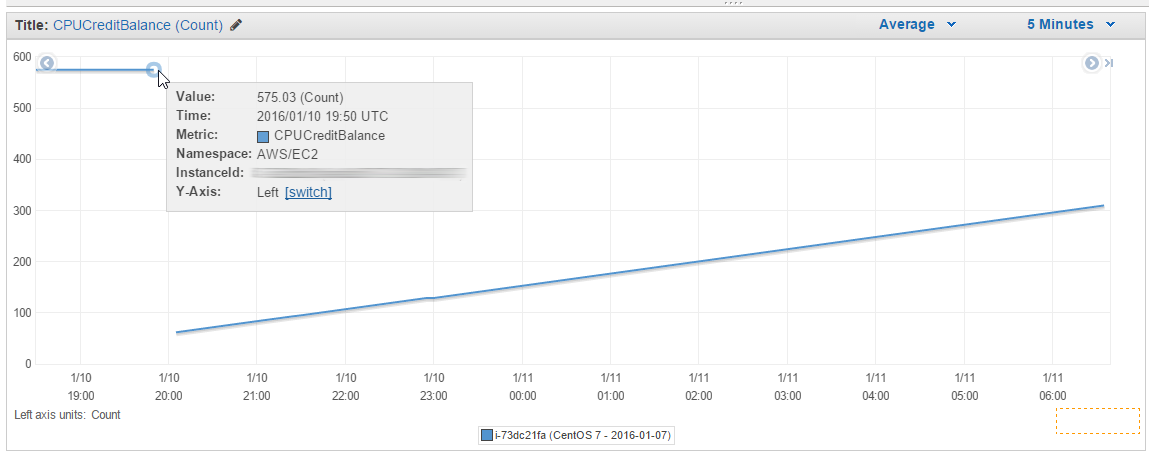
AWS Management Console: viewing the CPU credits accruals of an EC2 Burstable Performance instance
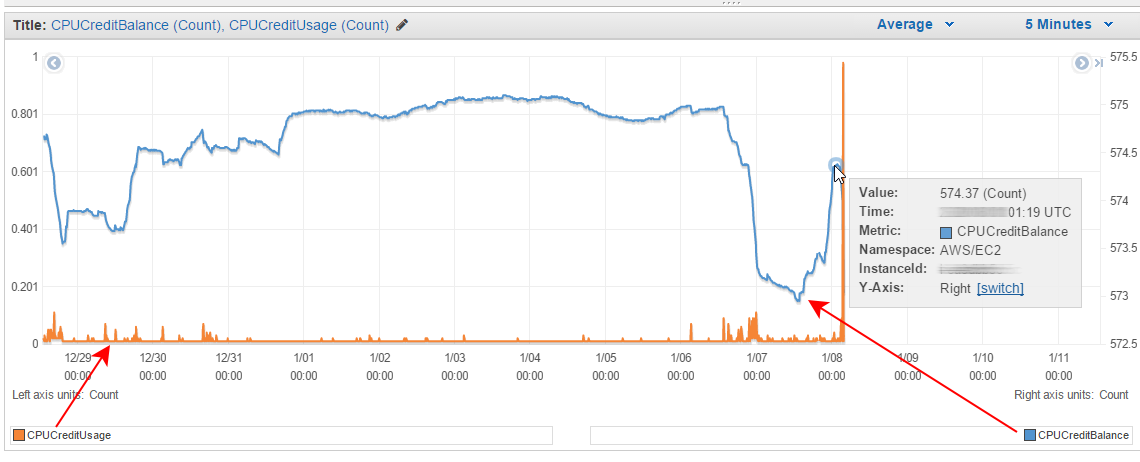
AWS Management Console: CPU credit balance vs. credit usage of an EC2 Burstable Performance instance

Filed Under: cloud, edge and everything in between Tagged With: AWS, burstable performance, CPU, EC2, instance

Leave a Reply Cancel reply

Your email address will not be published. Required fields are marked *

Subscribe

SSL/TLS Certificate Square (250 x 250)

Pearson Education (InformIT)

SSL/TLS Certificate Medium Rectangle (300 x 250)

Recent Posts

  • Upgrading from CentOS 6 to CentOS 7 and Beyond?
  • How To Figure Out Who is Signing In To Dovecot to Send or Retrieve Email
  • OpenSSH 9.9 Introduces Enhanced Quantum-Resistant Algorithms
  • OpenSSL 3.3 Final Release is now live!
  • How to Activate HTTP/2 with TLS 1.3 Encryption in NGINX for Secure Connections without a Performance Penalty
  • Is AWS sucking your budget dry? Strip it down to the nitty-gritty (without breaking stuff)
  • How to attach and mount an NVMe EBS volume on EC2
  • SELinux security contexts: correcting SELinux labels on a file system
  • Intel gobbling up Israeli Tower Semiconductor, Stock Goes Through The Roof
  • NGINX on AWS EC2: setting up a web server from scratch on a domain of your choice
  • Log4j RCE and mitigation techniques
  • Set up logrotate for Postfix

Symantec

Categories

  • administration and orchestration
  • alerts
  • AWS
  • Bitcoin
  • cloud, edge and everything in between
  • cryptocurrencies
  • cybersecurity and cyber warfare
  • databases
  • DNS
  • encryption
  • events
  • FinTech and InsurTech
  • homeland security
  • HTTP Security Headers
  • industries
  • industry analysis
  • industry gossip
  • Java
  • Linux
  • mail servers
  • networking
  • news
  • NGINX
  • people
  • php-fpm
  • reviews
  • SELinux
  • tips and tricks
  • Uncategorized
  • web servers in the cloud

Tags

AMI AWS AWS EBS Azure certificate cipher suites cryptography cyber defense cybersecurity cyber security Diffie-Hellman DNS DNS over HTTPS Dovecot EBS EC2 email encryption Fedora HTTP/2 HTTPS IBM letsencrypt Linux logs MariaDB MFA MySQL NGINX OpenSSL permissions php-fpm PHP 7 postfix RegEx Route 53 RSA SELinux SQL SSH SSL TLS TLS 1.3 TLS vulnerabilities WordPress

Archives

  • January 2025
  • November 2024
  • October 2024
  • May 2024
  • January 2023
  • March 2022
  • February 2022
  • December 2021
  • December 2020
  • November 2020
  • September 2020
  • January 2020
  • November 2019
  • August 2019
  • July 2019
  • April 2019
  • December 2018
  • October 2018
  • September 2018
  • August 2018
  • June 2018
  • May 2018
  • April 2018
  • February 2018
  • December 2017
  • November 2017
  • October 2017
  • August 2017
  • April 2017
  • February 2017
  • January 2017
  • November 2016
  • September 2016
  • August 2016
  • July 2016
  • March 2016
  • February 2016
  • January 2016
  • December 2015
  • November 2015
  • October 2015
  • September 2015
  • July 2015
  • February 2015

Recent Comments

    Wicked fast Networking (With a Government Clearance to Boot)

    ©2022 CybrAnalytiqa OÜ

    • Content purchasing and syndication